
DocuSign Integration in Salesforce
Step 1: Create a DocuSign account using the below link.
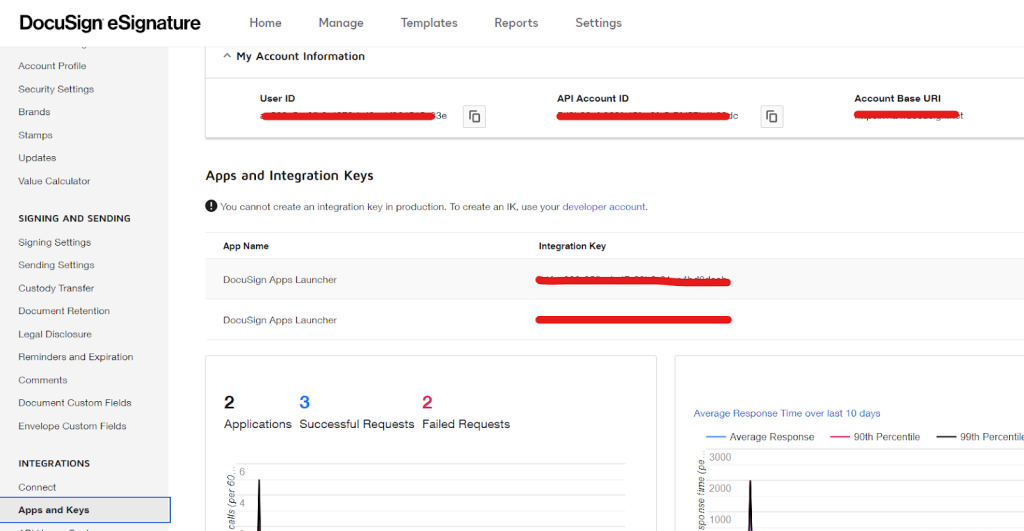
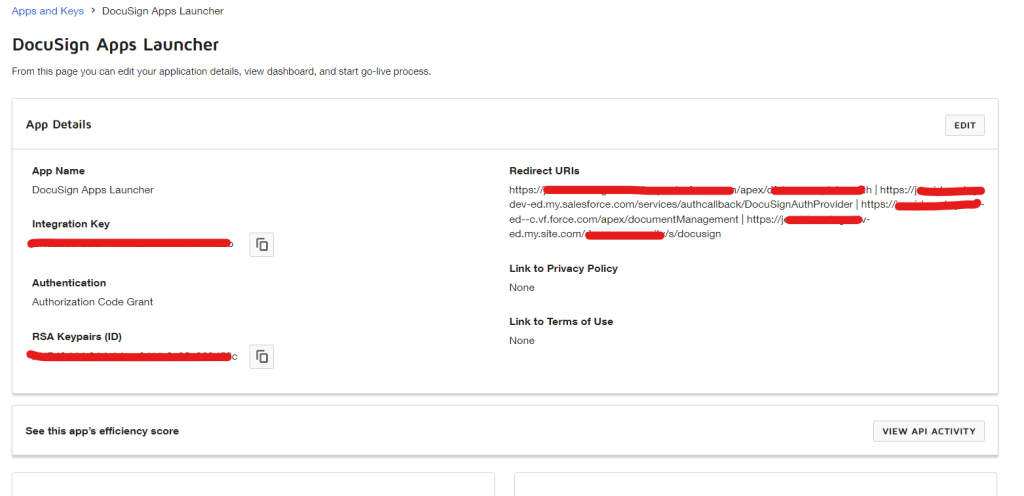
Step 2: After creating the account, Go to settings → apps and keys and create a new connected app for integration. After creating the app, save the integration key and private key.
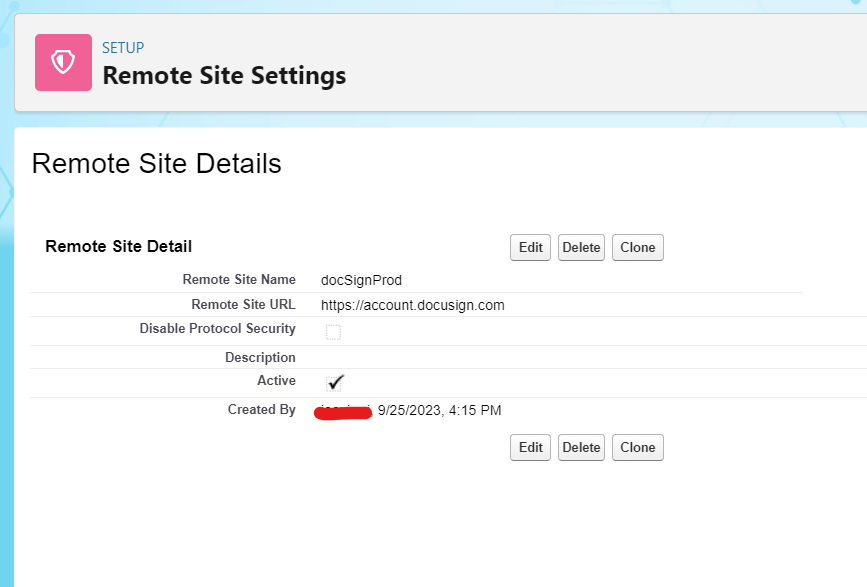
Step 3: Create remote site settings in salesforce via setup → remote site settings
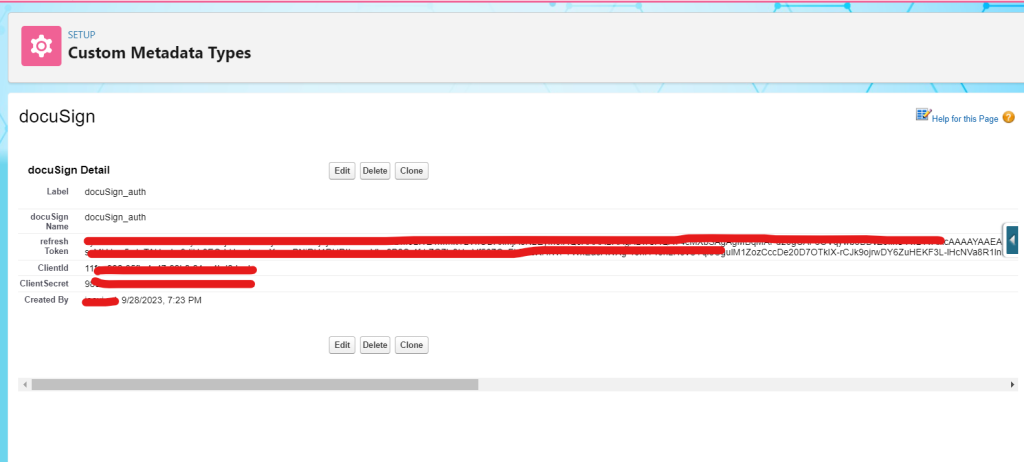
Step 4: Create a custom metadata record to store docusign credentials.
Step 5: Create an apex class to integrate DocuSign.
public with sharing class docuSignCtrl {

     @AuraEnabled

    public static docuSign__mdt docuSign_Credentials(){

        docuSign__mdt docuSign_metadata=[select

  id,ClientId__c,ClientSecret__c,refresh_Token__c from docuSign__mdt where

  DeveloperName='docuSign_auth' limit 1];

        return docuSign_metadata;

    }


    @AuraEnabled

    public static String getAccessToken(String authCode){


        auth_info docuSignAuth;


        if(String.isNotBlank(authCode)){

            docuSignAuth=getDocuSignToken(authCode);


            if(String.isNotBlank(docuSignAuth.access_token)){


              docuSign_accessToken=docuSignAuth.access_token;

                     }

        }

        return docuSign_accessToken;

    }


    public static auth_info getDocuSignToken(string authCode) {


        docuSign__mdt docuSign_metadata=docuSign_Credentials();


        Http http = new Http();

        HttpRequest req = new HttpRequest();

        req.setEndpoint('https://account.docusign.com/oauth/token?grant_type=authorization_code&code='+authCode);

        req.setMethod('POST');

              req.setHeader('Authorization', 'Basic '+EncodingUtil.base64Encode(blob.valueOf(docuSign_metadata.ClientId__c+':'+docuSign_metadata.ClientSecret__c)));

        req.setHeader('Content-Type','application/json');

        req.setHeader('Content-Length', '0');

        HttpResponse rep = http.send(req);

        auth_info docuSign_auth=(auth_info)

                        Json.deserialize(rep.getBody(), auth_info.class);

        return docuSign_auth;


    }


    @AuraEnabled

    public static String sendDoc_for_sign(String documentId,String accessToken,String recipientEmail,string recipientName){


        contentVersion[] documentVersion=[select id,title,versionData from contentVersion where id=:documentId];


        try {

            String envelopBody='{}';


            String documentBase64 = EncodingUtil.base64Encode(documentVersion.get(0).versionData);

            String doc_Id ='001';

            String fileExtension = 'pdf';

            String name = documentVersion.get(0).title;


            String jsonString = '{'

            +'"documents": ['

                +'{'

                +'"documentBase64":"'+documentBase64+'",'

                +'"documentId": "'+doc_Id+'",'

                +'"fileExtension": "'+fileExtension+'",'

                +'"name": "'+name+'",'

                +'}'

            +'],'

            +'"emailSubject": "Simple Signing Example",'

            +'"recipients": {'

            +' "signers": ['

                +' {'

                +'  "email":"'+recipientEmail+'",'

                +'  "name": "'+recipientName+'",'

                +' "recipientId":"1001"'

                +'},'

                +']'

            +'},'

            +'"status": "sent"'

            +'}';


            Http httpTosent = new Http();

            HttpRequest httpReq = new HttpRequest();

            httpReq.setEndPoint('https://docusingBaseUrl/restapi/v2.1/accounts/docusignAccId/envelopes');

            httpReq.setMethod('POST');

            httpReq.setHeader('Authorization', 'Bearer '+accessToken);

            httpReq.setHeader('Content-Type','application/json');

            httpReq.setBody(jsonString);

            httpReq.setTimeout(60000);

            httpResponse res=httpTosent.send(httpReq);

            system.debug(res.getBody());

            return Json.serialize('{"recipient":"'+recipientEmail+'","envelope":'+res.getBody()+'}');

        } catch (Exception e) {

            throw new AuraHandledException(e.getMessage());

        }

    }


    public class auth_info{

        public string access_token{get;set;}

        public string refresh_token{get;set;}

        public string error_description{get;set;}

    }

}
Step 6: create a Lightning web component to upload the document.
docuSignFileuploader.Html
 <template>


    <lightning-spinner if:true={isLoading}></lightning-spinner>

    <lightning-card>

      <template lwc:if={showSignIn}>

        <div class='slds-align_absolute-center'>

          <lightning-button variant="brand" label="signIn"

                          onclick={sign_docuSign}></lightning-button>

        </div>

      </template>

      <template lwc:else>

        <div>


  <div class='slds-align_absolute-center'style="width:fit-content">


            <div style="width:fit-content">

              {fileName}

              <lightning-file-upload name="fileUploader" accept='.pdf'

                           onuploadfinished={handleUploadFinished}


                  class="fileUploader">

              </lightning-file-upload>


            </div>

            <lightning-icon icon-name='action:approval'

                                        class="uploadSuccess_icon"

              if:true={isUploaded_to_SF}></lightning-icon>


            <div style="margin-left:10%;width: 20pc;">

              <lightning-record-edit-form object-api-name="User">

                <label for="fieldid">select Recipient</label>

                <lightning-input-field field-name="ContactId" id="fieldid"

                                variant="label-hidden"


              onchange={handleRecipient_change}></lightning-input-field>

              </lightning-record-edit-form>

            </div>


          </div><br>

          <div class='slds-align_absolute-center'

                                               style="width:fit-content">

            <lightning-button label="send document" variant="brand"

                                     onclick={send_document_to_docuSign}

              disabled={isButtonEnable}></lightning-button>

          </div>

        </div>

      </template>

    </lightning-card>


    <div if:true={isUploaded}>


  <section class="slds-modal slds-fade-in-open">

        <div class="slds-modal__container">

          <button class="slds-button slds-button_icon slds-modal__close

                                          slds-button_icon-inverse">

            <lightning-icon icon-name="utility:close" variant='inverse'

                             onclick={closePopUp}></lightning-icon>

            <span class="slds-assistive-text">Cancel and close</span>

          </button>

          <div class="slds-modal__header">

            <h1 id="modal-heading-01" class="slds-modal__title

                                   slds-hyphenate">Success</h1>

            <lightning-icon icon-name="action:approval"

                                    style="zoom:60%"></lightning-icon>

          </div>

          <div class="slds-modal__content slds-p-around_medium"

                                       id="modal-content-id-1">

            <h3 style="text-align:center">Your Document SuccessFully Sent

                                         to DocuSign.</h3><br>


            <div>

              <table class="docuSign_table">

                <tr>

                  <td>Document Name: {uploaded_document.name}</td>

                  <td>Recipient: <lightning-formatted-email

                       label={uploaded_document.recipient}

                                 value={uploaded_document.recipient}>

              </lightning-formatted-email></td>

                </tr>

                <tr>

                  <td>Salesforce DocumentId:

                  <a>{uploaded_document.contentVersionId}</a></td>

                  <td>Status: {uploaded_document.status}</td>

                </tr>

                <tr>

                  <td>DocuSign EnvelopId:

                     <a>{uploaded_document.envelopeId}</a></td>

                </tr>

              </table>

            </div>


          </div>

          <div class="slds-modal__footer">

            <button class="slds-button slds-button_neutral"

                               aria-label="Cancel and close"

              onclick={closePopUp}>Close</button>

          </div>

        </div>

      </section>

      <div class="slds-backdrop slds-backdrop_open"

                                          role="presentation"></div>

    </div>

  </template>
docuSignFileuploader.Js
import { LightningElement, track, api, wire } from 'lwc';

 import { getRecord,createRecord } from 'lightning/uiRecordApi';

 import sendDoc from '@salesforce/apex/docuSignCtrl.sendDoc_for_sign';

 import docuSign_Credentials from

                '@salesforce/apex/docuSignCtrl.docuSign_Credentials';


 import getAccessToken from

                       '@salesforce/apex/docuSignCtrl.getDocuSignToken;

 export default class LightningUploader extends LightningElement {

    uploaded_document = {};

    AccessToken;

    showSignIn;

    isUploaded;

    isUploaded_to_SF;

    isLoading;

    fileName;

    @track recipientData;

    recipient_conId;


 signIn_url;


    @wire(getRecord, { recordId: '$recipient_conId', fields:

 ['Contact.Id', 'Contact.Name', 'Contact.Email'] })

    recipientRecord({ error, data }) {

        if (data) {

            this.isLoading = false;

            this.recipientData = data;

        }

    }


    connectedCallback() {

                this.isLoading = true;

        let docuSign_authCode = new

                   URL(window.location.href).searchParams.get('code');

        getAccessToken({ authCode: docuSign_authCode }).then((res) => {

                this.showSignIn = false;

                this.AccessToken = res;

                this.isLoading = false;

        })

    }


    handleUploadFinished(event){

        console.log('event>>>',event);

        this.uploaded_document = {};

        let uploadedDoc=event.detail.files[0];

        this.uploaded_document['contentVersionId'] =

                                      uploadedDoc.contentVersionId;

        this.uploaded_document['name'] = uploadedDoc.name;

        this.fileName = uploadedDoc.name;

        this.isUploaded_to_SF=true;

    }


    handleRecipient_change(event) {

        this.recipient_conId = event.target.value;

        if (this.recipient_conId) {

            this.isLoading = true;

        } else {

            this.recipientData = null;

        }


    }


    get isButtonEnable() {


        if (this.recipientData &&

          this.uploaded_document.hasOwnProperty('contentVersionId')) {

            return false;

        } else {

            return true;

        }

    }


    send_document_to_docuSign() {

        this.isLoading = true;

        if (this.AccessToken && this.recipientData &&

              (this.uploaded_document.hasOwnProperty('contentVersionId')

            && this.uploaded_document['contentVersionId'])) {


            sendDoc({ documentId:

          this.uploaded_document['contentVersionId'],

          accessToken: this.AccessToken, recipientEmail:

          this.recipientData.fields.Email.value, recipientName:

          this.recipientData.fields.Name.value })

          .then((res) => {

                  const documentRes = JSON.parse(JSON.parse(res));

                  this.uploaded_document['envelopeId'] =

                  documentRes['envelope']['envelopeId'];

                  this.uploaded_document['recipient'] =

                  documentRes['recipient'];

                  this.uploaded_document['status'] =

                  documentRes['envelope']['status'];


                this.isUploaded = true;

                this.isLoading = false;

            })

        } else {

            let toastMessage = '';

            if (!this.AccessToken) {

                toastMessage += 'Authentication failure,check

                                      accessToken!';

            }

            if (!this.recipientData) {

                toastMessage += (toastMessage) ? ',No recipient Found' :

                          'No recipient selected!';

            }

            if(!this.uploaded_document.hasOwnProperty('contentVersionId'))

                 {

                toastMessage += (toastMessage) ? ',Please uploade the

                  Document' : 'Please uploaded Document!';

            }


            this.showToastMessage(toastMessage, 'info');

            this.isLoading = false;

        }

    }


    sign_docuSign() {


        docuSign_Credentials().then((res)=>{

            let signIn_url = 'https://account.docusign.com/oauth/auth?redirect_uri=https://YourEndPoint/democommunity/s/docusign&response_type=code&client_id='+res.ClientId__c+'&scope=signature';


            window.open(signIn_url, 'self');

        })


    }


    closePopUp() {

        this.isUploaded = false;

    }


    showToastMessage(message, variant) {

        this.dispatchEvent(

            new ShowToastEvent({

                title: variant,

                variant: variant,

                message: message

            })

        )

        this.isLoading = false;

    }


   }
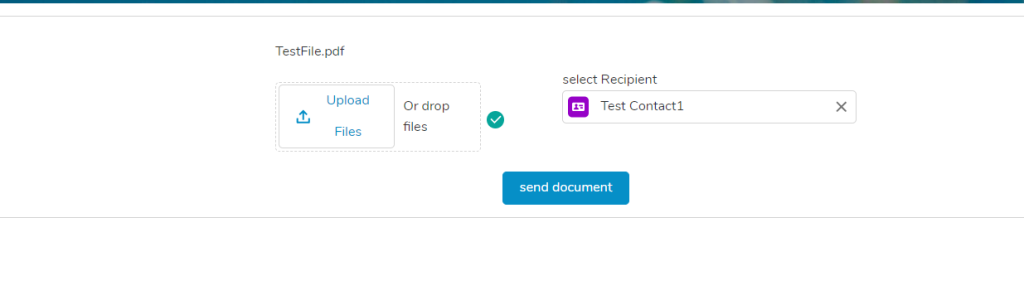
Output:
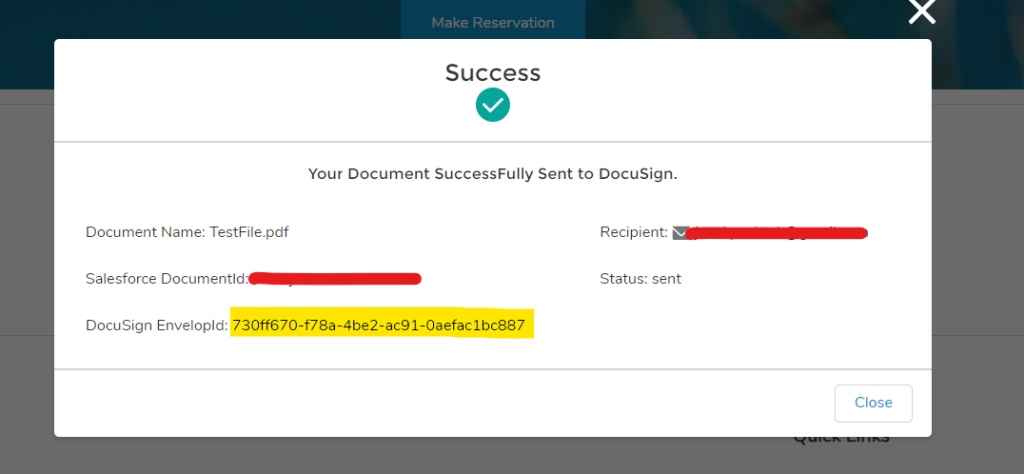
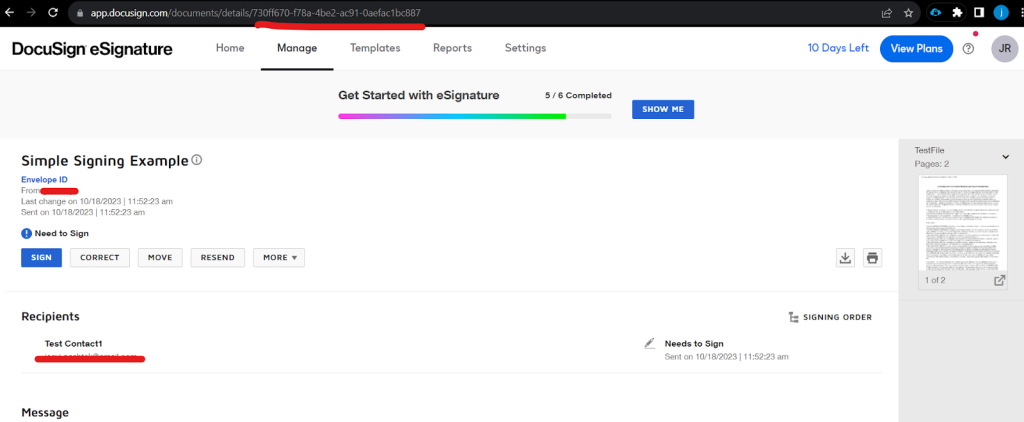
We can see the envelope ID in the DocuSign just created from Salesforce.