
How to handle Navigations in LWC
Step 1 : Create a Lightning Web Component in VS Code.
Step 2 : We need to import NavigationMixin from lightning/navigation.
Step 3 : We should extend this NavigationMixin module to LightningElement.
This is our LWC component to show a demo of the navigationmixin.
navigationMixinDemo.js
import { LightningElement , api } from 'lwc';


import { NavigationMixin } from 'lightning/navigation';


export default class NavigationMixinDemo extends NavigationMixin

(LightningElement) {


            @api recordId;


            handleHomePage(){

        this[NavigationMixin.Navigate]({

            type: 'standard__namedPage',

            attributes: {

                pageName: 'home'

            },

        });

            }


handleAccountHomePage(){

        this[NavigationMixin.Navigate]({

            type: 'standard__objectPage',

            attributes: {

                objectApiName: 'Account',

                actionName: 'home',

            },

        });

            }

            handleAccountrecordCreate(){

        this[NavigationMixin.Navigate]({

            type: 'standard__objectPage',

            attributes: {

                objectApiName: 'Account',

                actionName: 'new',

            },

        });

            }


handleRelatedContact() {

        this[NavigationMixin.Navigate]({

            type: 'standard__recordRelationshipPage',

            attributes: {

                recordId: this.recordId,

                objectApiName: 'Account',

                relationshipApiName: 'Contacts',

                actionName: 'view',

            },

        });

            }

  }
navigationMixinDemo.html
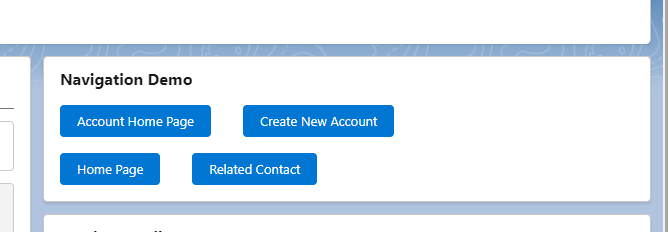
- Account Home Page – By using this button, we can navigate to the Account Home page.
- Create Account – By using this button, we can navigate to the new Account record creation page.
- Home Page – This button can directly navigate to the Homepage of the App.
- Related Contact – This button can be used to navigate to the relationship page.
<template>

                    <lightning-card title="Navigation Demo">


                        <div class="slds-m-around_medium">


                            <lightning-button variant="brand"

                                label="Account Home Page"

                                onclick={handleAccountHomePage}

                                ></lightning-button>


                            <lightning-button variant="brand"

                                label="Create Account Record"

                                onclick={handleAccountrecordCreate}

                                class="slds-p-left_x-large"

                            ></lightning-button>


                        </div>


                        <div class="slds-m-around_medium">


                            <lightning-button variant="brand"

                                label="Home Page"

                                onclick={handleHomePage}

                                ></lightning-button>


                            <lightning-button variant="brand"

                                label="Related Contact"

                                onclick={handleRelatedContact}

                                class="slds-p-left_x-large"

                            ></lightning-button>


                        </div>


                    </lightning-card>

        </template>