

Update Record Using Quick Action in LWC
Create the LWC Component
To create quick action component we can use the <lightning-quick-action-panel> feature. The <lightning-record-edit-form> option will allow the user to edit the data.
QuickAction.HTML:
<template>
<lightning-quick-action-panel header="Edit Fields Action">
<lightning-record-edit-form record-id={recordId}
object-api-name={objectApiName}onsuccess={handleSuccess}>
<lightning-input-field field-name="Name"></lightning-input-field>
<lightning-input-field field-name="MobilePhone
"></lightning-input-field>
<lightning-input-field field-name="Email
"></lightning-input-field>
<lightning-input-field field-name="AccountId
"></lightning-input-field>
<lightning-button variant="neutral" label="Cancel" onclick={cancelAction}></lightning-button>&nbsp;
<lightning-button variant="brand" label="Save" type="submit"></lightning-button>
</lightning-record-edit-form>
</lightning-quick-action-panel>
</template>
QuickAction.JS:
import { LightningElement, api } from 'lwc';
import { ShowToastEvent } from 'lightning/platformShowToastEvent';
import { CloseActionScreenEvent } from 'lightning/actions';

export default class FormFill extends LightningElement {
   @api recordId;
   @api objectApiName;


handleSuccess(e) {
        this.dispatchEvent(new CloseActionScreenEvent());
        this.dispatchEvent(
            new ShowToastEvent({
                title: 'Success',
                message: 'Contact Record Updated!',
                variant: 'success'
            })
        );
   }

cancelAction(){
      this.dispatchEvent(new CloseActionScreenEvent());
   }

}
QuickAction.Meta.Xml:
<?xml version="1.0"?>
<LightningComponentBundle xmlns="http://soap.sforce.com/2006/04/metadata">
    <apiVersion>54.0</apiVersion>
    <isExposed>true</isExposed>
    <masterLabel>Quick Action In LWC</masterLabel>
    <targets>
        <target>lightning__RecordPage</target>
        <target>lightning__AppPage</target>
        <target>lightning__HomePage</target>
        <target>lightning__Tab</target>
        <target>lightning__RecordAction</target>

    </targets>
    <targetConfigs>
        <targetConfig targets="lightning__RecordAction">
            <actionType>ScreenAction</actionType>
        </targetConfig>
    </targetConfigs>
</LightningComponentBundle>
Create a Action on target object
Go to Contact Object: Object Manager => Contact => Button, Links, and Actions.
- Create a new Action

- Add the action button into the page layout on mobile & lightning actions section.
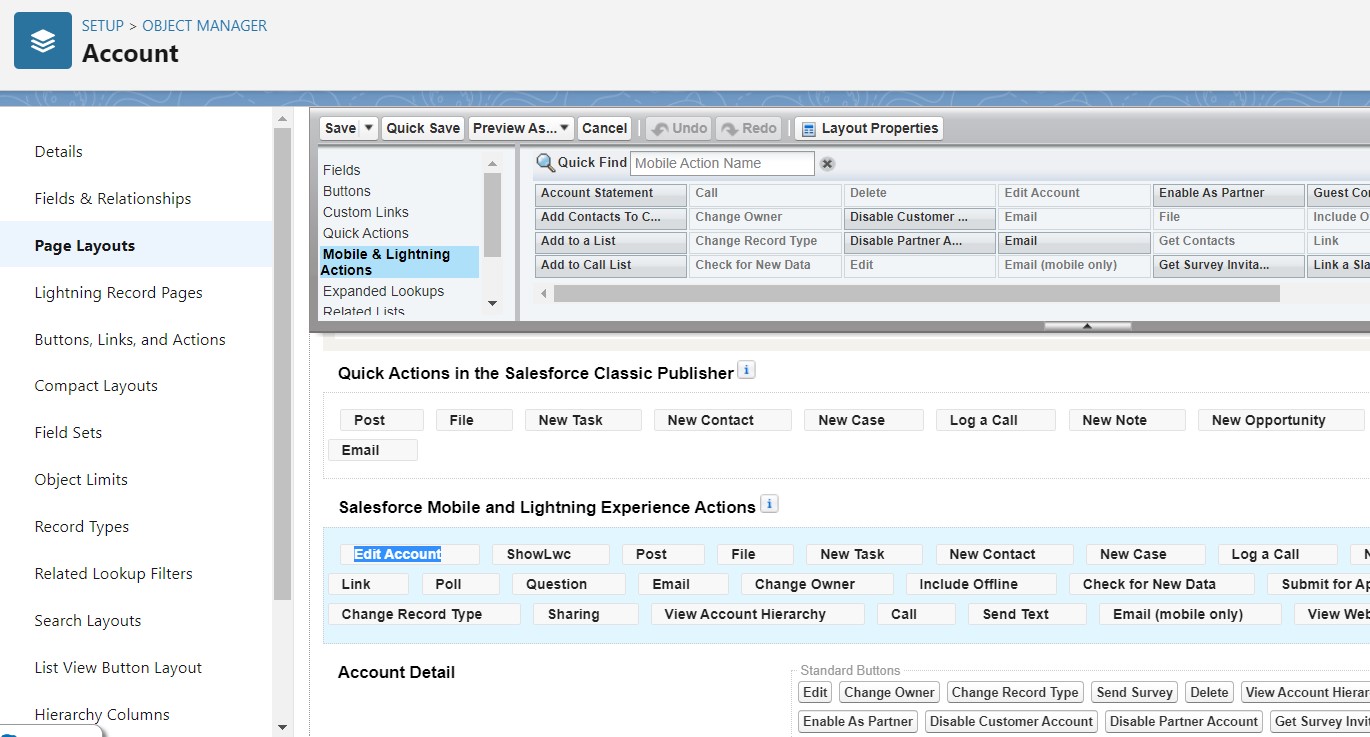
- Go to target object record you will notice that the action button were created.

- Now we are able to update the record.
