How to use Show Toast Event in LWC
Step 1 : Create a Lightning Web Component in VS Code.
Step 2 : We need to import ShowToastEvent from lightning/platformShowToastEvent. The toast remains visible for 3 seconds or until the user clicks the close button.
Step 3 : We create a component to show the toast message by using button clicks.
demoShowToastEvent.js
import { LightningElement } from 'lwc';


import { ShowToastEvent } from 'lightning/platformShowToastEvent';


export default class DemoShowToastEvent extends LightningElement {


                    handleClickButton1(event){

                        const e = new ShowToastEvent({

                                                    title: 'Success!',

                                                    message: 'Button 1 Clicked - Success',

                                                    variant: 'success',

                                        });

                        this.dispatchEvent(e);

                    }


                    handleClickButton2(event){

                        const e = new ShowToastEvent({

                                    title: 'Success!',

                                    message: 'Button 2 Clicked - Error',

                                    variant: 'error',
                        });
                        this.dispatchEvent(e);
                    }
}
<template>

                    <lightning-card title="Show Toast Event">

                <div class="slds-m-around_medium">

                    <lightning-button variant="success"

                    label="Button 1"

            onclick={handleClickButton1}

            ></lightning-button>


                            <lightning-button variant="destructive"

                      label="Button 2" onclick={handleClickButton2}

                      class="slds-p-left_x-large"

                      ></lightning-button>

                </div>

                    </lightning-card>

</template>
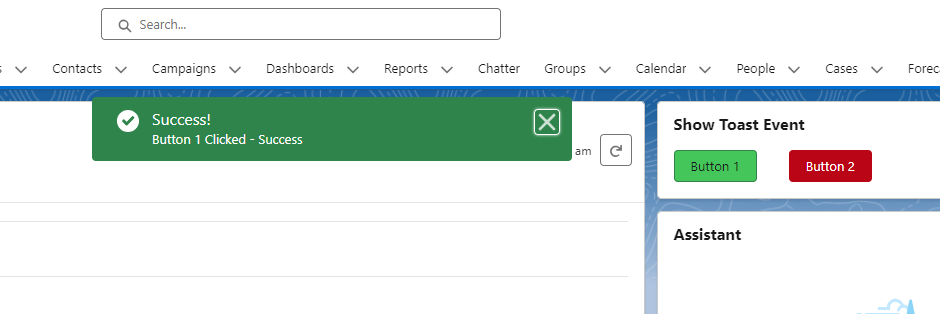
Show Toast Message using LWC in Salesforce looks like the following images.